LinkedIn auto apply extension, with an AI agent that reads every job
Aupply is a LinkedIn auto apply extension for Chrome, Edge and Brave. It finds recent Easy Apply jobs that fit your resume, reads each job description, fills in every page of the Easy Apply form and submits it, from your own browser while you do something else.
It is LinkedIn auto apply with a person in the loop: the AI does the searching, reading and form filling, and you are asked only for the personal facts it does not have.
What Aupply is
Aupply is a browser extension with a side panel, for Chrome, Edge, Brave and other Chromium browsers on a computer, paired to your Aupply account. You install it from the Chrome Web Store, and your browser keeps it up to date.
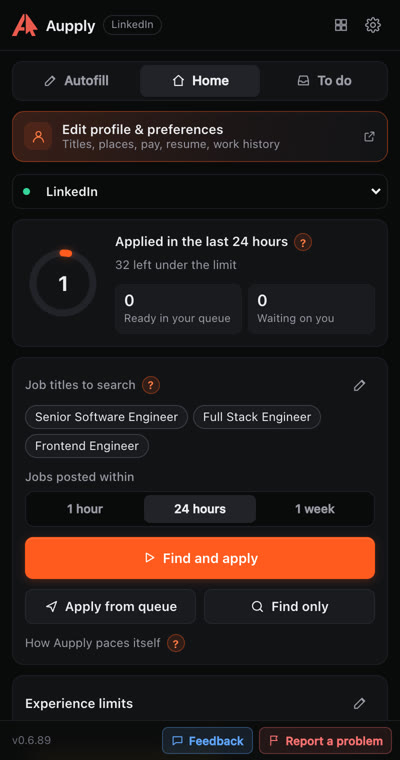
Aupply's server decides what to do next and the extension carries it out in your own browser. Setup takes a resume and a few preferences. After that Aupply works through the day's jobs while you do something else.
How it finds jobs
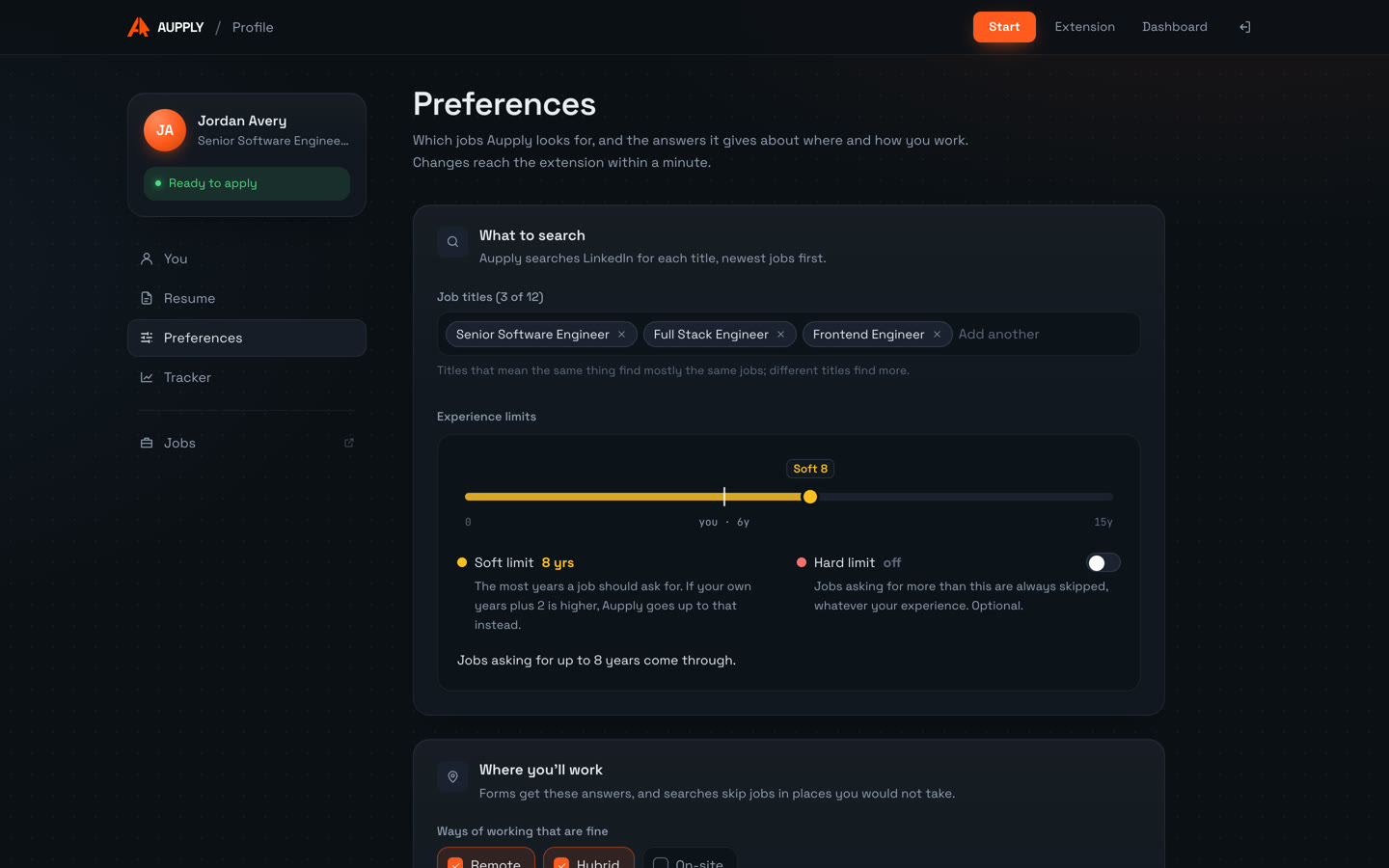
Aupply builds your apply queue by searching LinkedIn for the job titles you chose, in each country you apply in. It keeps Easy Apply jobs from the time window you picked (the last hour, 24 hours or week) and skips jobs you already applied to. It reads up to 60 full job descriptions each time it builds the queue.
How it reads and judges each job description
Before any scoring, Aupply drops jobs that clearly do not fit. Then an AI reads each remaining job description, picking out the skills, the years asked for, the seniority, the location and remote scope, and sponsorship. It scores the fit against your resume profile and your preferences.
Jobs at or above your minimum fit join the apply queue. The rest are skipped. With no AI available, Aupply uses a deterministic score instead.
How it matches jobs to your resume
Matching is about the work, not keyword overlap: the skills and experience on your resume against what the job asks for. How Aupply matches LinkedIn jobs to your resume lists exactly what it checks.
Which jobs it applies to and which it skips
Aupply applies to LinkedIn Easy Apply jobs that fit you. Before scoring it drops:
- jobs in places you ruled out
- jobs that name a technology stack you excluded
- jobs that ask for more years than you have, or a seniority far above yours
- jobs where sponsorship is not offered and you need it
- jobs for citizens or residents only, where you are not one
- jobs with stated pay below your minimum, in the same currency
- postings that send you to an outside application site
A strong match that is not Easy Apply is not applied to. It is saved for you to apply to by hand, under "Saved for you" on your dashboard.
How it fills and submits Easy Apply forms
Aupply opens each queued job and clicks Easy Apply. It fills every page of the form (text, numbers, dropdowns, radios and checkboxes), goes through Next and Review, and submits once.
For the resume step it picks the resume LinkedIn already has on file, and uploads your Aupply resume only when LinkedIn requires one. A job that fails is retried later in the run. A job that cannot continue is stopped and recorded. Every application, skip and failure appears on your dashboard, with the resume used.
Screening questions
Answers come from three places, in this order:
- rules over your profile and preferences
- your saved answers
- AI, for the remaining questions, using your resume
Personal facts such as notice period, pay, work authorization and visa sponsorship are never generated by AI. They come from you. Aupply accepts the consent that comes with an application, such as a privacy notice, and never ticks marketing, SMS or follow-company boxes.
When it asks you
When a form asks for a personal fact Aupply does not have, that job waits and the question appears in the side panel. The run continues with other jobs. Your answer is saved and reused for every later application, so each question is asked once. Aupply asks you for what only you know explains what counts as a personal fact.
Where it runs
In your own browser, signed in to LinkedIn as you, in one background tab while you work in other tabs. Your LinkedIn password never reaches Aupply. How Aupply works walks through the whole loop.
Limits
- Aupply applies by itself to LinkedIn Easy Apply jobs, and to Naukri and Wellfound jobs in beta. On 50+ other job sites, such as Workday, Greenhouse and IBM's career site, Autofill fills the application and you submit.
- Desktop browsers only (Chrome, Edge, Brave and other Chromium browsers), and LinkedIn in English. In another language the run pauses with instructions.
- If LinkedIn signs you out, shows a check or limits your account, the run stops.
Privacy and security
Aupply never sees your LinkedIn password and does not store LinkedIn cookies. You can disconnect the extension from the Extension page at any time, which revokes it at once. Read Security at Aupply and the privacy policy for what is stored and where.
See it work
- 01
Open the application
On a supported job site, Aupply shows Auto-fill this application, with a Rewrite resume box beside it.
- 02
Press Autofill
Aupply reads the form and the job, attaches your resume and fills name, contact details, links, title, years and education.
- 03
AI writes the long answer
"Why are you interested in this role?" is written from your resume and the job, and marked for you to check.
- 04
You submit
The panel says how many fields were filled. You read the form and press Submit. The application goes to your tracker.
Recorded in real time on Aupply's own sample job, with a made-up profile. Try it there yourself.
Screenshots
Supported platforms
Finds Easy Apply jobs that fit you and applies to them for you.
Naukri (beta)
Refreshes your profile, finds jobs in India and applies, answering the recruiter's questions.
Wellfound (beta)
Finds startup jobs that fit you and applies, answering each company's questions.
Autofill fills the application, and you submit, on 52 sites:
- Workday
- Greenhouse
- Lever
- Ashby
- iCIMS
- Taleo
- SAP SuccessFactors
- Oracle Recruiting Cloud
- Workable
- BambooHR
- Rippling
- Jobvite
- Avature
- BrassRing
- Dayforce
- Paylocity
- Phenom
- Eightfold
- Teamtailor
- Recruitee
- JazzHR
- Breezy HR
- Pinpoint
- Comeet
- Dover
- Freshteam
- Gusto
- Homerun
- JobScore
- Polymer
- TriNet Hire
- GovernmentJobs
- Oleeo
- Amazon
- Apple
- Meta
- IBM
- Uber
- Tesla
- Netflix
- TikTok
- ByteDance
- Roblox
- Waymo
- Okta
- Cursor
- Mechanize
- Indeed
- SEEK
- Naukri
- Wellfound
In Chrome, Edge, Brave and other Chromium browsers on a computer.
LinkedIn auto apply: questions
Is Aupply a LinkedIn auto apply extension?
Yes. Aupply is a browser extension for Chrome, Edge and Brave that finds LinkedIn Easy Apply jobs matching your resume and preferences, fills in every page of the Easy Apply form and submits it, at a person's pace with breaks. Up to 100 applications a day.
Does Aupply apply to every LinkedIn job it finds?
No. It reads each job description and skips jobs that do not fit your places, stack, years, seniority, work rights or pay. Strong matches that are not Easy Apply are saved for you to apply to yourself, and Autofill fills their forms on 50+ sites.
Does Aupply need my LinkedIn password?
No. It works in your own browser where you are already signed in to LinkedIn. Your LinkedIn password never reaches Aupply.
What does LinkedIn auto apply cost?
Aupply is free during early access, with no card needed. It installs from the Chrome Web Store.
Install Aupply
Aupply is an AI browser extension for job applications, for Chrome, Edge, Brave and other Chromium browsers. Its Autofill fills in application forms on 50+ job sites, such as Workday, Greenhouse and Lever, from your profile; you check the form and submit. It can rewrite your resume for each job, toward the job's requirements, keeping your employers, titles and dates as they are. On LinkedIn it goes further: it finds recent Easy Apply jobs that fit your resume and applies to them for you, at a person's pace with breaks. Up to 100 applications a day. It also applies on Naukri, where it keeps your profile freshly updated, and on Wellfound (both in beta), and records every application in one tracker. When a form asks for a personal fact it does not have, it asks you once and remembers the answer. Aupply is used by 150+ job seekers and is free during early access, with no card needed.
Related
- Job search automationAutomate your job search: Aupply searches LinkedIn, Naukri and Wellfound for jobs that fit your resume, applies at a person's pace and tracks it all. Free.
- Job matchingHow Aupply matches LinkedIn jobs to your resume: the checks it runs, how an AI reads each job description, the minimum fit, and what it does not consider.
- Job application autofillAupply autofills job applications on Workday, Greenhouse, Lever and 50+ sites: work history, screening questions and AI answers. You submit. Free.
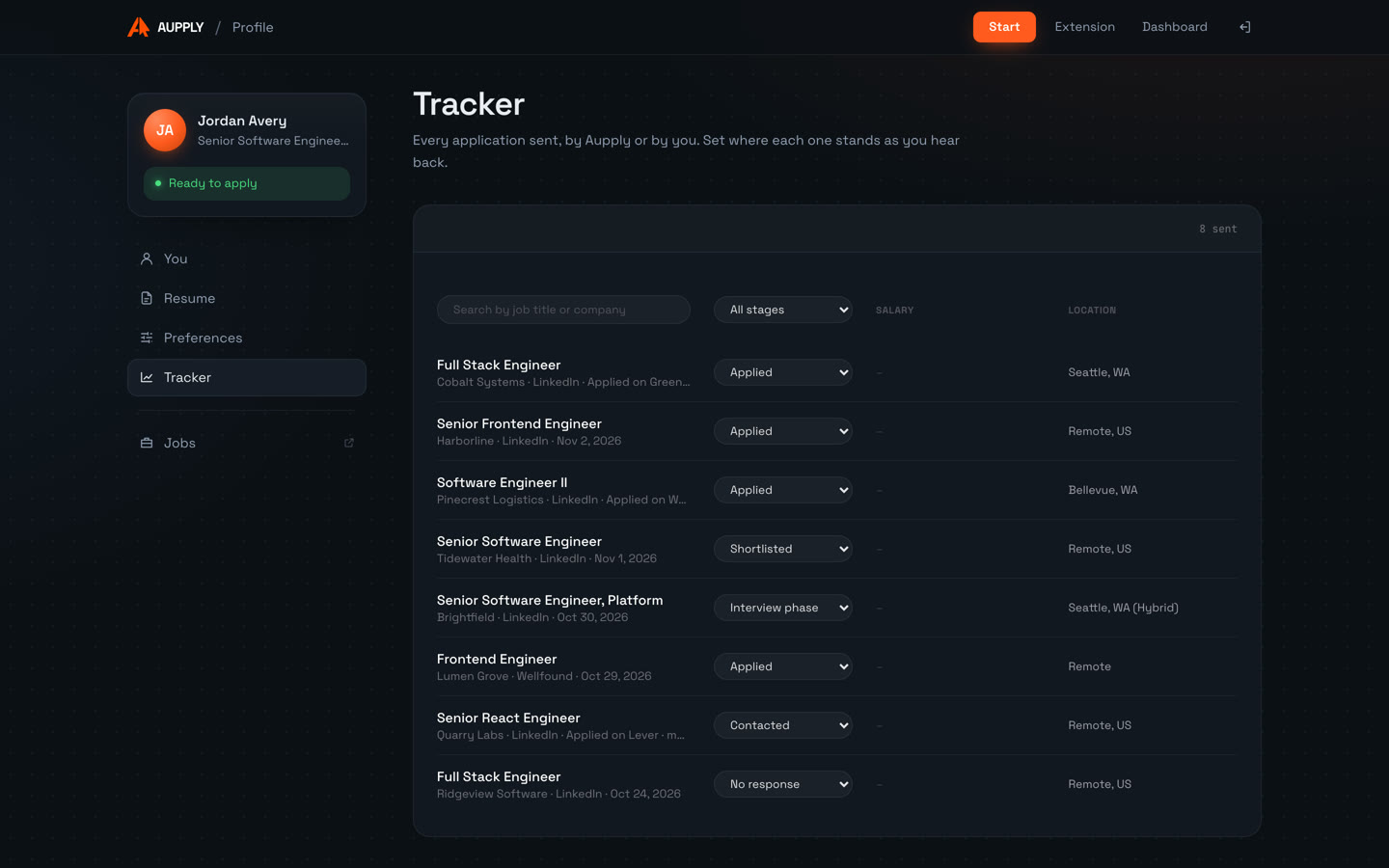
- Job application trackerA job application tracker that fills itself: every application Aupply sends or Autofill submits on 50+ sites is recorded, with stages you set. Free.